Saturday, August 1, 2015
Samsung Galaxy Star Advance SM-G350E Mic Ways Jumper
Solve microphone problem in Samsung Galaxy Star Advance SM-G350E with diagram help. First confirm that mic hole in inner body open, then disassemble mobile. Change mic then check mic points on motherboard circuit. If any point damage then follow the diagram and apply jumpers like diagram below.
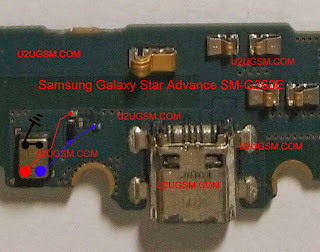
Samsung Galaxy Star Advance SM-G350E microphone Solution Jumper. Samsung Galaxy Star Advance SM-G350E Mic Not Working problem solution
Read more »

Samsung Galaxy Star Advance SM-G350E microphone Solution Jumper. Samsung Galaxy Star Advance SM-G350E Mic Not Working problem solution

Too Many Pattern Attempts Unlock Trick On Huawei Ascend Y530
Unlock pattern lock on Huawei Ascend Y530 by hard reset method. See instructions below to solve pattern lock problem. Backup off all important data before do that because this will remove all data on mobile memory and hard to get back data easily.

Warning:! Do this at your own risk! All your phone data (contacts, photos, videos, music, messages, applications, games, files,) will be lost! Please make backup first if you can!
1.Power off your phone
2.Press together volume up + power button
3.Select with volume keys "wipe data/factory reset" and press power to confirm
4.Select "yes-delete all data" and press power key to confirm
5.Wait until format ends
6.Select "reboot" and press push key to confirm
7.Wait until the phone restarts
Read more »
Warning:! Do this at your own risk! All your phone data (contacts, photos, videos, music, messages, applications, games, files,) will be lost! Please make backup first if you can!
1.Power off your phone
2.Press together volume up + power button
3.Select with volume keys "wipe data/factory reset" and press power to confirm
4.Select "yes-delete all data" and press power key to confirm
5.Wait until format ends
6.Select "reboot" and press push key to confirm
7.Wait until the phone restarts
Nokia Lumia 535 Remove Security Lock by Key Combination
Here is a simple way of removing security lock of Nokia Lumia 535 by key combination method. Please follow the instruction carefully and get your job done.
REMMEMBER!
Wactory reset will permanently delete all your data and customized settings,
and will remove any applications you’ve downloaded and installed. Be sure to back up
any data and files you want to keep before you do a factory reset.

Here is the step by step procedure:
1.Turn off your phone
2.Then press the Power-Button once 3.Press and Hold the Volume-Down-Button until you see the exclamation point "!" on your screen
4.You can now release all buttons
5.Press the following buttons below once in exact order:
- Volume-Up-Button
- Volume-Down-Button
- Power-Button
- Volume-Down-Button
Hard Reset GFive President G9 To Remove Pattern Lock
To remove pattern lock on GFive President G9 follow the instructions below in article carefully. Take backup of all data before reset device because it will delete all user data like media, messages, contacts on mobile memory.

Read more »

How To Hard Reset GFive President G9
- Remove battery
- Insert usb cable
- Press vol+ button
- Insert battery (wait for android logo)
- Press power key for recovery options display
- Use vol down key for selection of wipe data
- Press vol up key to wipe data.
- Use vol down key for wipe cache partition and press vol up to execute
- Reboot and you have done
Samsung Galaxy A3 Hard Reset to Remove Pattern Lock
There are many option of security in Android phone to secure your data from other people around your. Form these security option pattern lock is one of them. Pattern lock is being used in almost every smartphone.
Some time due to too many changes in pattern locks you forget your pattern. Then your have to apply hard reset to remove the pattern lock. here is a method to remove pattern lock of Samsung Galaxy A3 by hard reset.

- Turn Off Samsung Galaxy A3.
- Press and hold Volume Up + Home and Power keys together.
- Release both keys when Android logo will appear.
- From Android system recovery select Wipe data/Factory reset with volume down key and press power button to confirm selection.
- Select Yes -- delete all user data with volume and power to confirm. Reboot mobile to show home screen.
Subscribe to:
Posts (Atom)